

Measurement
Designing a corporate communications dashboard with four panes and a data-health rail
Build a blank, accessible communication dashboard with versioned definitions, data-quality warnings, correction controls and decision ownership.
A corporate communications reporting dashboard should expose uncertainty and action, not hide them behind coloured tiles. Cedar Vale Engineering Ltd is a fictional company used only as a design prompt for an England site decision; this is not a real case study. The blank template contains no counts, thresholds or sample results.
What to take away
- Use four panes for control, delivery, audience and decision instead of one blended score.
- A data-health rail must list source freshness, failed imports, unmatched records and open corrections.
- An action register shows who must investigate an issue and what closes the exception.
- Limit what each reader sees and test with a blank and a failure before production.
Write the header first
Place the decision question above every chart. Add the approved communication version, reporting period, timezone, data cut-off, dashboard version, owner and next review. Show whether the pack is draft, corrected or superseded. A reader should not need a hover state to discover that evidence is late.
Header fields above every chart
- Decision question above every chart
- Approved communication version and reporting period
- Timezone and data cut-off
- Dashboard version, owner, next review
- Statusdraft, corrected or superseded
The Government Analysis Function's February 2026 guidance on testing dashboards for design and accessibility recommends accessibility testing and supporting data tables. It is analytical guidance, not a private-company compliance certificate. Cedar Vale needs named accessibility and equality review for the real audience and format.
Use four panes, not one blended score
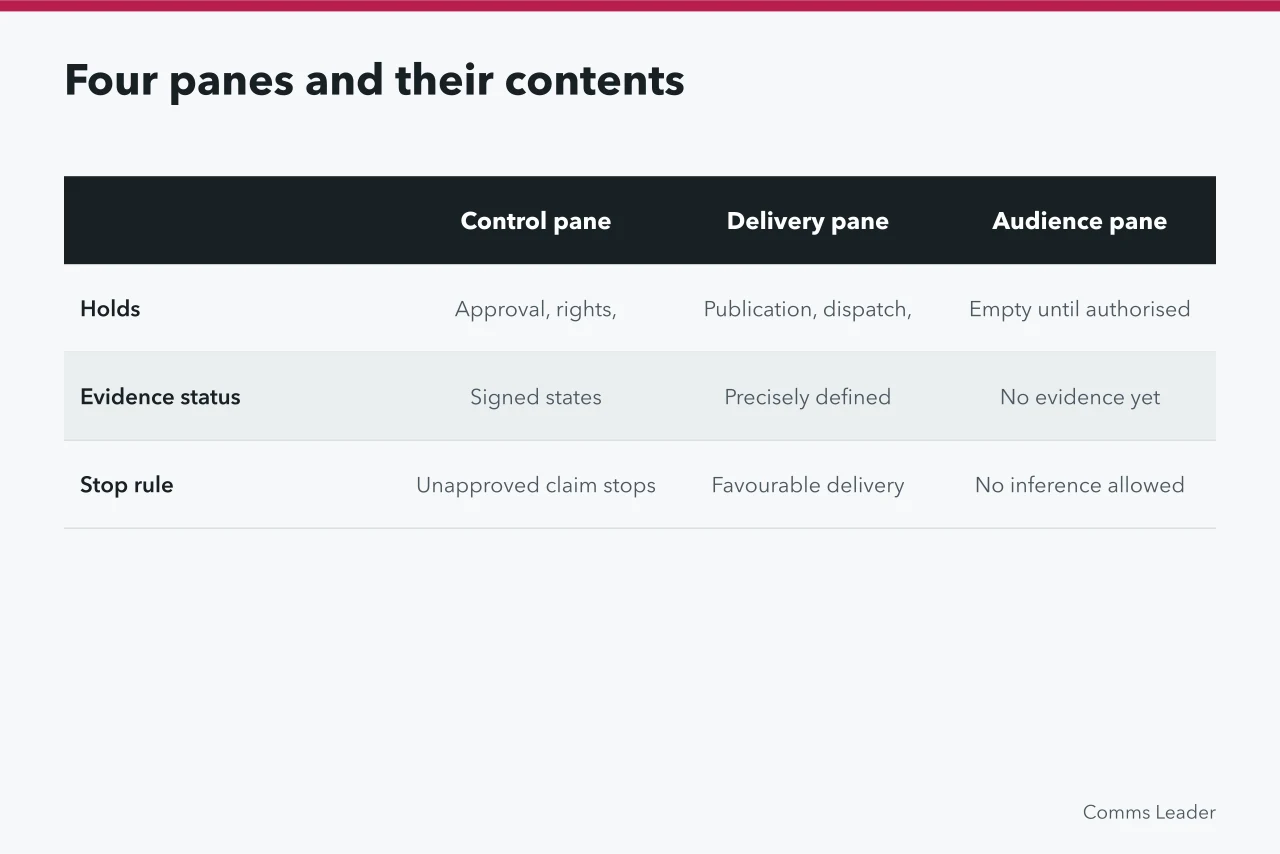
The control pane contains approval, source-copy, rights, accessibility and release-gate states. The delivery pane contains precisely defined publication, dispatch, endpoint and correction events. The audience pane is empty until an authorised research method supplies evidence. The decision pane records operational outcomes, attribution status and unresolved causal questions.
Each row in any pane needs these blank fields:
measure ID | purpose | event | eligible population | numerator | denominator | unit | period | timezone | exclusions | source/query version | missingness | owner | uncertainty | response
Do not use one traffic-light colour to offset hard failures. An unapproved claim remains a stop even if a delivery measure looks favourable.
Illustrative wireframe with fictional values:
| Pane | measure ID | event | unit | period | source version | missingness | owner | uncertainty | response |
|---|---|---|---|---|---|---|---|---|---|
| Control | CV-CTRL-01 | release gate check | status | 2026-03 | access register v3 | 0 missing | communications lead | approval pending | block release until approved |
| Delivery | CV-DEL-02 | dispatch to regional media | count | 2026-03 | dispatch log v2 | 1 late timestamp | delivery manager | timestamp may lag | reconcile in later version |
| Decision | CV-DEC-03 | enquiry volume after campaign | count | 2026-03 | CRM extract v5 | 2 unmatched records | insight lead | attribution unresolved | report association only |
Blank fields for every row
- Measure ID and purpose
- Event, eligible population, numerator, denominator
- Unit, period, timezone, exclusions
- Source/query version and missingness
- Owner, uncertainty, response
Add a data-health rail
Beside the main view, list source freshness, failed imports, unmatched records, duplicate handling, definition changes and open corrections. Preserve supplier dashboard labels as supplier definitions until the buyer reconciles them to source events.
NCSC logging guidance emphasises choosing logs for the questions they must answer and configuring needed fields and time correctly. That security guidance supports auditability, not communication performance.
Every transformation should have a query or workbook version, approver and reproducible input reference. Late-arriving records enter a later version with a correction note; they do not silently rewrite a signed report.
Example rail entry (illustrative):
- SourceCRM extract.
- Freshnesslast successful load predates the 2026-03 cut-off.
- Importfailed on field
region. - Correctionopen, owner insight lead.
- Close when the reload matches the control total.
Implementation can use a spreadsheet with protected ranges, a BI tool such as Power BI or Looker Studio, or a data catalogue with a query version field. Keep the field list as a controlled sheet and the data-health rail as a separate table.
Make the dashboard answerable
Add an action register below the visuals. Each row needs the issue, evidence ID and accountable person. Include decision due date, permitted response and closure proof.
A chart may flag an incomplete source, but only the register shows who must investigate it and what closes the exception. Keep commentary on the relevant dashboard version, so no explanation outlives a change to the underlying definition.
Give reviewers a plain export containing the displayed rows, definitions and revision history. They should be able to reproduce the view without relying on a presenter's memory. If the main screen shows an estimate, its publisher, method, geography and retrieval date belong beside it, not in a remote footnote.
Limit what each reader sees
An executive view can show the decision and exceptions without personal-level records, while analysts may need controlled access to reconcile underlying events. Communications staff do not automatically need employee, customer or journalist identifiers.
The ICO's data-protection-by-design guidance was updated on 5 February 2026 and calls for privacy throughout a processing lifecycle. Qualified reviewers must establish Cedar Vale's purposes, roles, access and retention.
Test with a blank and a failure
Before production is enabled, test keyboard access, reading order, text alternatives, table download and zoom with synthetic records. Check keyboard order on every filter and confirm the table download at 200 per cent zoom.
Then introduce a missing denominator, late source and revised status definition. The dashboard passes only if it displays each problem, blocks over-interpretation and points to an owner.
Finish with a change log stating what moved, why, who approved it and which earlier reports are affected. If the accessible table, definitions or correction history cannot be recovered independently of the visual, the build stays on hold.
Before you act
- Place the decision question above every chart.
- Define each pane and its blank fields.
- List data-health items beside the main view.
- Add an action register below the visuals.
- Limit access by reader role.
- Test keyboard order and a missing denominator.
Common questions
What should a corporate communications dashboard expose instead of hiding?
The header must show the decision question, the pack status and the data cut-off. That context belongs above every chart.
What does the control pane contain?
The control pane contains approval, source-copy, rights, accessibility and release-gate states. It answers whether a claim can be published at all.
How should late-arriving records be handled?
Late-arriving records enter a later version with a correction note. They do not silently rewrite a signed report. The change log records what moved and who approved it.